This might be a bit basic but I thought I would give a step by step guide on how to customise a SharePoint list form. The first step is you need a web control.
In your Visual Studio project you need a TEMPLATES folder and a CONTROLTEMPLATES folder beneath it. This is where you add your user control. Lets not worry too much about the code on the user control just yet.
Next we want to make the web control available when the SharePoint list form loads.
To do this add the line
<%@ Register TagPrefic="xyz" TagName="MyWebControl" src="~/_controltemplates/WebControl.ascx" %>
into the web page.
Now there are two ways to do this depending on what you want to achieve.
Firstly you can add the line into the master page so that is available to every page on the site.
Secondly you can add it to the custom page associated to the list.
In either event, the result is that the code on the web control is executed when your page loads. Since your web control is injected into the HTML of the page you can do all kindes of things from adding inline css styles that can be applied to the page or by injecting javascript onto the page to hide a menu or menu item.
One approach is to add an asp:panel onto the ASCX and embed your css styles between the start and end tags of the panel. You can also embed javascript to change the way the page is displayed.
Your code behind can then determine when to make the panel visible or hidden which will determine if the styles are applied to the page or not.
If you need to have more control over the javascript go to the code behind and use the RegisterClientScript() method or add a literal control and set the text property to the javascript function. When the literal control is rendered, the javascript is executed.
Friday, January 21, 2011

SharePoint 2007 Creating Custom Forms for Custom Lists
I was recently wondering how I was going to create custom forms (EditForm.aspx, DispForm.aspx) for a custom list.
Now I want to deploy my custom list as a feature of course so I need to add these forms and the associated schema.xml file into my Visual Studio project.
But how was I to go about creating the form?
I though about using SharePoint Designer but a cold shiver ran down my spine.
Than a friend of mine pointed out this wonderful utility: OCDExportList
It is an extension to the stsadm command and is available as a WSP. It's deployed globally to your SharePoint site.
After that you can use the command
stsadm -o ocdexportlist -url http://mysiteurl -name listname -dir c:\temp
Now I want to deploy my custom list as a feature of course so I need to add these forms and the associated schema.xml file into my Visual Studio project.
But how was I to go about creating the form?
I though about using SharePoint Designer but a cold shiver ran down my spine.
Than a friend of mine pointed out this wonderful utility: OCDExportList
It is an extension to the stsadm command and is available as a WSP. It's deployed globally to your SharePoint site.
After that you can use the command
stsadm -o ocdexportlist -url http://mysiteurl -name listname -dir c:\temp
and it will generate in the c:\temp directory the schemal.xml file and assoicated forms for this list. Copy this across to the feature folder of the custom list and you should be good to start customizing.
That's a great time saver.
SharePoint 2007 Approval Workflow US Date format in Emails
I am using SharePoint 2007 with SP2 in a 64bit environment. The SharePoint Server regional settings are set to English (UK) and the SharePoint site I am using is also set English UK settings. I am also using the out-of-the-box approval workflow so you would expect that any dates are shown in UK format both in the workflow history and in emails sent by the workflow.
Wrong. They display in US format (MM/dd/yyyy).
Now when I Googled this I found this site which suggested it is fixed in the October 2008 Cumulative update. Indeed the Microsoft support page explicitly states as fixed "Sharepoint workflow notification e-mail messages do not use locale date and time formats".
Wrong again.
Wrong. They display in US format (MM/dd/yyyy).
Now when I Googled this I found this site which suggested it is fixed in the October 2008 Cumulative update. Indeed the Microsoft support page explicitly states as fixed "Sharepoint workflow notification e-mail messages do not use locale date and time formats".
Wrong again.
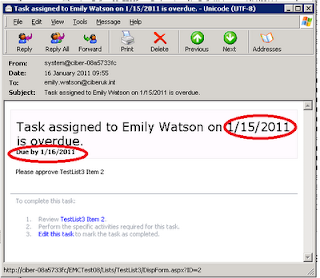
Maybe it was fixed back in October 2008 (pre SP2) but I can tell you it's not working post SP2. I raised a support call with Microsoft and proved that the dates are indeed in US format when they shouldn't be.
You require the August 2010 Cumulative Update from Microsoft to be applied to get this to work. Once the hotfix is applied then it all works prefectly with the due date correctly appearing in UK format both in the workflow history and in the emails. This even works on workflows that are in flight before you applied the hotfix.
While I am glad to have a solution, Microsoft should be ashamed that something as basic as this has had to be fixed twice. Zero points, Microsoft!
You require the August 2010 Cumulative Update from Microsoft to be applied to get this to work. Once the hotfix is applied then it all works prefectly with the due date correctly appearing in UK format both in the workflow history and in the emails. This even works on workflows that are in flight before you applied the hotfix.
While I am glad to have a solution, Microsoft should be ashamed that something as basic as this has had to be fixed twice. Zero points, Microsoft!
Saturday, January 15, 2011
BizTalk Server Evaluation Version Upgrade to Full Version
One of my customers had installed an evaulation version of BizTalk Server 2009 for their test environment, and sure enough the version expired and BizTalk stopped working.
So they needed me to upgrade it to the full version (in this case we used the Developer Edition but the same process is used for upgrading to Standard or Enterprise Editions).
But when I started the Install process it immediatley gave the message that you can't upgrade the evaluation version and you must uninstall and reinstall.
At first sight this looks disastrous but infact you can recover everything because unsinstall does not delete the Biztalk databases. But there are a number of steps you should take before uninstalling BizTalk.
1. Export the applications to MSI files and Export the Bindings just in case it all goes horribly wrong.
2. Make a screen shot of the host instances in BizTalk Administration because these will be deleted and you will need to recreate them.
3. The host instances use service accounts and you'll need the passwords for these accounts.
4. Ensure that the account you are going to use to install BizTalk is the same one you used for the Evaluation version. If like me you don't know, use an account who is a local administrator and is sysadmin on the SQL Server box where the databases are installed (dbowner of all the BizTalk databases may be enough).
5. Make sure you have a copy of the BTSNTSVC.exe.config file as this may contain configuration settings.
6. Have a backup of the Enterprise Single Sign-On secret - and you must know what the password is (ideally the password hint will help). This is vital. If you don't have the password for the backup you will be hosed. I don't know if you are able to do the backup once the evalaution has expired. If you can open a command window and navigate to c:\Program Files\Common Files\Enterprise Single Sign-On. Then use
ssoconfig –backupSecret backupfilename
The Enterprise SSO option is currently configured so select Join an existing SSO system. You will get a warning symbol indicating you may need to restore the SSO master secret (you will definitely need to).
On the Group otion select Join an existing BizTalk Group. On the BizTalk Server RunTime do not Create In-Process Host and Instance because In-Process Host is still present. Liekwise do not create Isolated Host and Instance.
Configure the other options appropriately and Apply the Configuration.
If all goes well the Configuration will complete successfully. But you are not done.
7. First open a command window and navigate to c:\Program Files\Common Files\Enterprise Single Sign-On. Then use
ssoconfig –restoreSecret backupfilename
It will prompt you for the password showing you the password hint. This is why point 6 was so important if you don't have a backup or you don't know the password you are stuffed.
8.Open BizTalk Administration go to the Host Instances and add the ones that were originally there (which is why we did point 2 above). Use the same accounts and passwords and start them up.
9. Edit the BTSNTSvc.exe.config file and add any custom entries that you saved from point 5. Stop and restart the BizTalk Service(s).
That should be it, you should be up and running again. Its a pity Microsoft don't offer a better upgrade path than this. If the full version is available on MSDN my advice is avoid using the evaluation copy.
So they needed me to upgrade it to the full version (in this case we used the Developer Edition but the same process is used for upgrading to Standard or Enterprise Editions).
But when I started the Install process it immediatley gave the message that you can't upgrade the evaluation version and you must uninstall and reinstall.
At first sight this looks disastrous but infact you can recover everything because unsinstall does not delete the Biztalk databases. But there are a number of steps you should take before uninstalling BizTalk.
1. Export the applications to MSI files and Export the Bindings just in case it all goes horribly wrong.
2. Make a screen shot of the host instances in BizTalk Administration because these will be deleted and you will need to recreate them.
3. The host instances use service accounts and you'll need the passwords for these accounts.
4. Ensure that the account you are going to use to install BizTalk is the same one you used for the Evaluation version. If like me you don't know, use an account who is a local administrator and is sysadmin on the SQL Server box where the databases are installed (dbowner of all the BizTalk databases may be enough).
5. Make sure you have a copy of the BTSNTSVC.exe.config file as this may contain configuration settings.
6. Have a backup of the Enterprise Single Sign-On secret - and you must know what the password is (ideally the password hint will help). This is vital. If you don't have the password for the backup you will be hosed. I don't know if you are able to do the backup once the evalaution has expired. If you can open a command window and navigate to c:\Program Files\Common Files\Enterprise Single Sign-On. Then use
ssoconfig –backupSecret backupfilename
The Enterprise SSO option is currently configured so select Join an existing SSO system. You will get a warning symbol indicating you may need to restore the SSO master secret (you will definitely need to).
On the Group otion select Join an existing BizTalk Group. On the BizTalk Server RunTime do not Create In-Process Host and Instance because In-Process Host is still present. Liekwise do not create Isolated Host and Instance.
Configure the other options appropriately and Apply the Configuration.
If all goes well the Configuration will complete successfully. But you are not done.
7. First open a command window and navigate to c:\Program Files\Common Files\Enterprise Single Sign-On. Then use
ssoconfig –restoreSecret backupfilename
It will prompt you for the password showing you the password hint. This is why point 6 was so important if you don't have a backup or you don't know the password you are stuffed.
8.Open BizTalk Administration go to the Host Instances and add the ones that were originally there (which is why we did point 2 above). Use the same accounts and passwords and start them up.
9. Edit the BTSNTSvc.exe.config file and add any custom entries that you saved from point 5. Stop and restart the BizTalk Service(s).
That should be it, you should be up and running again. Its a pity Microsoft don't offer a better upgrade path than this. If the full version is available on MSDN my advice is avoid using the evaluation copy.
Wednesday, October 6, 2010
InfoPath 2007 and Forms Services - Deployment Part 2
Forgive me reader, it has been a while since my last post.
I have a project that involved deploying three InfoPath browser-enabled forms made available on a SharePoint 2007 site. The site is an extranet site, accessed over the Internet by users who use an AD account and password to login.
The infrastruture uses ForeFront Threat Management Gateway (the successor to ISA server). Now TMG is a bit of a God-send for developers because it handles SSL for you. TMG hold the Server Certificate and takes all inbound https requests and maps them to http requests on port 80. Very neat, because it means that I can focus on developing the SharePoint site and not worry about SSL. Not quite.
I ran into some issues with the InfoPath forms. They worked absolutely fine when called internally: reading data from a web service upon load and then submitting to a web service on Submit. When I called the same forms when accessing the site externally, then I got several problems.
1. I could not load the forms at all initially.
2. When the form did load, the company logo would not display. IE gave me a warning message about unsecure content on the page and I could not disable it even by allowing Mixed Content in IE options.
3. The third error came when I tried to submit. "The form cannot be submitted to the Web server either because your computer is offline or because the host server is currently unavailable".
4. When the form closed, I got an error whereas it should have redirected back to the calling page. Again it was working fine internally.
The first problem is due to the supposed complexity of the url used to call the form (its the passed parameters). This is TMG rejecting the url. It is solved by modifying the HTTP policy on the Firewall rule to uncheck the options "Blocking high bit characters " and "Verify Normalization".
The second problem is fixed by the same solution as the third problem. If you take a look at the source code there is a variable g_objCurrentFormData that holds the content for the form. Buried in there you will find the url for the location of the xsn and its "Source" (the url it will return to) but InfoPath replaces the http:// with http:\u002f\u002f. Isn't that obscure? The issue is that it is using http and not https so you need to create a Link Translation on the Firewall policy that maps http:\u002f\u002fcontoso.com with https:\u002f\u002fcontoso.com. When that is done it, the form submitted successfully and also displayed the company logo without any warning messages from IE.
The fourth problem is due to the url for calling the form. It includes an &Source= parameter that is the return url for the form. But it uses the http url and that won't work externally. Trying to change it to be https also gave an error. So in the end I simply removed it, and the form still managed to return to the originating url. By the way, to force the form in the browser append &OpenIn=Browser.
So in the end I didn't have to make any changes to my form to make it work externally, it was all down to settings in TMG.
Go in peace - and say twenty Hail Mary's.
I have a project that involved deploying three InfoPath browser-enabled forms made available on a SharePoint 2007 site. The site is an extranet site, accessed over the Internet by users who use an AD account and password to login.
The infrastruture uses ForeFront Threat Management Gateway (the successor to ISA server). Now TMG is a bit of a God-send for developers because it handles SSL for you. TMG hold the Server Certificate and takes all inbound https requests and maps them to http requests on port 80. Very neat, because it means that I can focus on developing the SharePoint site and not worry about SSL. Not quite.
I ran into some issues with the InfoPath forms. They worked absolutely fine when called internally: reading data from a web service upon load and then submitting to a web service on Submit. When I called the same forms when accessing the site externally, then I got several problems.
1. I could not load the forms at all initially.
2. When the form did load, the company logo would not display. IE gave me a warning message about unsecure content on the page and I could not disable it even by allowing Mixed Content in IE options.
3. The third error came when I tried to submit. "The form cannot be submitted to the Web server either because your computer is offline or because the host server is currently unavailable".
4. When the form closed, I got an error whereas it should have redirected back to the calling page. Again it was working fine internally.
The first problem is due to the supposed complexity of the url used to call the form (its the passed parameters). This is TMG rejecting the url. It is solved by modifying the HTTP policy on the Firewall rule to uncheck the options "Blocking high bit characters " and "Verify Normalization".
The second problem is fixed by the same solution as the third problem. If you take a look at the source code there is a variable g_objCurrentFormData that holds the content for the form. Buried in there you will find the url for the location of the xsn and its "Source" (the url it will return to) but InfoPath replaces the http:// with http:\u002f\u002f. Isn't that obscure? The issue is that it is using http and not https so you need to create a Link Translation on the Firewall policy that maps http:\u002f\u002fcontoso.com with https:\u002f\u002fcontoso.com. When that is done it, the form submitted successfully and also displayed the company logo without any warning messages from IE.
The fourth problem is due to the url for calling the form. It includes an &Source= parameter that is the return url for the form. But it uses the http url and that won't work externally. Trying to change it to be https also gave an error. So in the end I simply removed it, and the form still managed to return to the originating url. By the way, to force the form in the browser append &OpenIn=Browser.
So in the end I didn't have to make any changes to my form to make it work externally, it was all down to settings in TMG.
Go in peace - and say twenty Hail Mary's.
Sunday, July 18, 2010
Writing to MSMQ
I was recently trying to write a message to MSMQ on a remote server. I knew there were two steps but I didn't realize there was a third.
1. Modify the Queue name to the correct format
2. On the MSMQ queue give write access to the account you are running under
3. Install MSMQ on the source server
MSMQ name
The MSMQ format name is a particular structure you need to get right - including the case:
FormatName:DIRECT=OS:<servername>\private$\<queuename>
Write Access
If your code was running as a web service as mine was, then the App Pool identity must be a domain account and that account needs to have write access to the MSMQ on the target server.
Install MSMQ locally
I hadn't relaized this. You must install MSMQ in the local server where the code is running. The reason is that it logs messages in an Outbound Queue. This is what you would need if you were running in an off-line situation and then wanted the messages forwarded when you were on-line. I did not relaize that it would also do this even with a permanently connected enviroment. So install MSMQ locally and life will be good.
1. Modify the Queue name to the correct format
2. On the MSMQ queue give write access to the account you are running under
3. Install MSMQ on the source server
MSMQ name
The MSMQ format name is a particular structure you need to get right - including the case:
FormatName:DIRECT=OS:<servername>\private$\<queuename>
Write Access
If your code was running as a web service as mine was, then the App Pool identity must be a domain account and that account needs to have write access to the MSMQ on the target server.
Install MSMQ locally
I hadn't relaized this. You must install MSMQ in the local server where the code is running. The reason is that it logs messages in an Outbound Queue. This is what you would need if you were running in an off-line situation and then wanted the messages forwarded when you were on-line. I did not relaize that it would also do this even with a permanently connected enviroment. So install MSMQ locally and life will be good.
InfoPath 2007 and Forms Services - Deployment
I've always hated deploying InfpPath forms to a Production environment because I couldn't figure out how to change the path of any data connections without modifying the data connections with the appropriate url which means installing InfoPath in a Production environment.
I recently found that with an InfoPath form with managed code you can modify the manifest.xsf manually in NotePad and modify any urls. Publishing the form from VS will then create an XSN with the correct urls. This avoids using the data connection wizrd which will try to access the url.
Now I already new that you can convert the data connections into a UDCX file and then store that in a local data connections library but the path to the data connections library was still hard coded in the XSN with the server name. So if you deploy to production the InfoPath form is looking for the data connection library you used in development. It seemed like a ridiculous situation.
But finally I stumbled on this post which explains what to do. The post deploys the InfoPath form as a feature and uses WSP builder to bundle it as a solution.
The trick is to select "centrally managed data connection library (advanced)" when you modify the data connections. Copy the UDCX out of the data connection library that you used, modify it as desribed in the post. Then upload it in Central Administration -> Application Management -> Manage data connection files. Then deploy your InfoPath forms. Note that if you have managed code, the DLL not only has to be in the GAC but it also needs to be in the Feature folder .
I have to confess that we had major problems trying to create a feature for the InfoPath forms. It kept saying the form was not browser enabled which it clearly was. In the end because we only had 3 forms we gave up and installed it manually. Low and behold it worked in the browser perfectly. I should add that the forms are really quick to load, so much better than using the InfoPath client.
I recently found that with an InfoPath form with managed code you can modify the manifest.xsf manually in NotePad and modify any urls. Publishing the form from VS will then create an XSN with the correct urls. This avoids using the data connection wizrd which will try to access the url.
Now I already new that you can convert the data connections into a UDCX file and then store that in a local data connections library but the path to the data connections library was still hard coded in the XSN with the server name. So if you deploy to production the InfoPath form is looking for the data connection library you used in development. It seemed like a ridiculous situation.
But finally I stumbled on this post which explains what to do. The post deploys the InfoPath form as a feature and uses WSP builder to bundle it as a solution.
The trick is to select "centrally managed data connection library (advanced)" when you modify the data connections. Copy the UDCX out of the data connection library that you used, modify it as desribed in the post. Then upload it in Central Administration -> Application Management -> Manage data connection files. Then deploy your InfoPath forms. Note that if you have managed code, the DLL not only has to be in the GAC but it also needs to be in the Feature folder .
I have to confess that we had major problems trying to create a feature for the InfoPath forms. It kept saying the form was not browser enabled which it clearly was. In the end because we only had 3 forms we gave up and installed it manually. Low and behold it worked in the browser perfectly. I should add that the forms are really quick to load, so much better than using the InfoPath client.
Subscribe to:
Posts (Atom)